
For many citizens in Karnataka, caste and income certificates play an important role in their lives. Whether it is for education, applying for government schemes, or jobs, caste and income certificates are some of the important documents required to claim reservations.
In this article, we will show you how you can apply for a caste or income certificate on your own through Karnataka’s Nadakacheri, also known as the AJSK portal.
Required Documents to Apply for Caste & Income
- Aadhaar Card
- Ration Card
- Self Declaration Form
- Applicant Passport Size Photo
- Voter ID (Optional)
- Salary Certificate (Optional)
- Bank Statement for the last one year – Only for urban citizens (Optional)
Among the above-mentioned documents, the Aadhaar Card and Ration Card are mandatory to upload to the portal, and the remaining documents are optional and can be submitted only if they are available. These additional documents can help the Revenue Department officers validate your application properly.
Process to Apply for Caste & Income in Karnataka
Step 1: The first step is to visit the AJSK public login portal at the following URL: https://ajsk.karnataka.gov.in/NK5_Online/Login/Login_Public
You can also use the button given below for direct access.
Step 2: Now, enter your mobile number and click Get OTP. Once you receive the OTP, enter it, fill in the CAPTCHA displayed, and click the LOGIN option.
Please wait for a few minutes to receive the OTP. If you still do not receive it, use the Resend OTP option.
Step 3: Once logged in to the portal, at the top-right corner, select your preferred language (Kannada or English).
Please note that depending on the language you select here, the certificate will also be printed in the same language. So, make sure to choose the right option according to your requirement.
Step 4: Now, read the instructions displayed on the screen carefully. Under the NEW REQUEST menu, select the certificate you want to apply for. For example: Caste Certificate or Income Certificate.
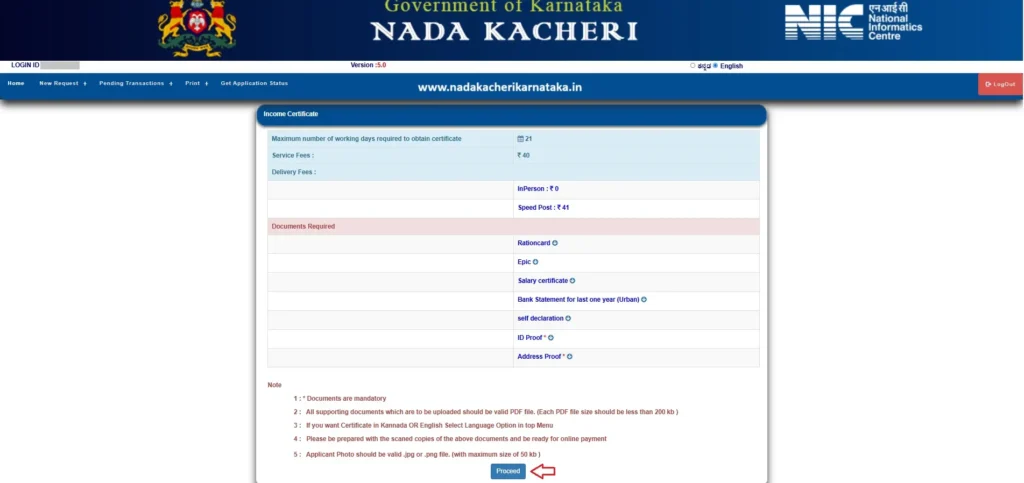
Step 5: Now, details such as the maximum number of working days required to obtain the certificate, service fee, and required documents pertaining to the certificate you selected will be displayed.
Check the details and click PROCEED to start filling out the application.
Step 6: Now, you will be redirected to the Aadhaar authentication page. Here, enter your Aadhaar number and the OTP received on your Aadhaar-linked mobile number, and click the Submit button.
Step 7: Now, you will be redirected back to the AJSK (Nadakacheri) portal.
If the authentication is successful, your name, address, PIN code, and mobile number will be pre-filled by the system according to your Aadhaar details, and these fields cannot be edited.
If you need to make any changes to these details, correct the details in your Aadhaar first and then re-apply for the caste or income certificate.
Manually fill in your father’s name, mother’s name, and email address, and then click the NEXT button.

Step 8: Now, select your certificate-related details such as Reservation Category, Caste Group, and Caste Name from the drop-down menus.
Then, enter the total annual income of the family (from all sources) and click NEXT.
Step 9: Now, your photo will be displayed as per your Aadhaar details. Here, you need to upload the documents mentioned above in PDF format, with a file size of less than 300 KB, one by one.
Click the Choose File option for the document you want to upload, select the relevant file from your device, and click the Upload Document button. Repeat the same process for all the documents and then click the Submit button.

Step 10: After you submit your documents, the GSC number, also called the RD number, will be generated immediately.
Once the RD number is generated, you cannot edit any of the details you filled in during the previous steps. So, please check all the details carefully before clicking the Submit button.
Step 11: Now, all the details you have filled in will be displayed for your review.
If everything looks correct, click the Proceed To E-Sign button and complete the e-authentication by providing your Aadhaar number and OTP.
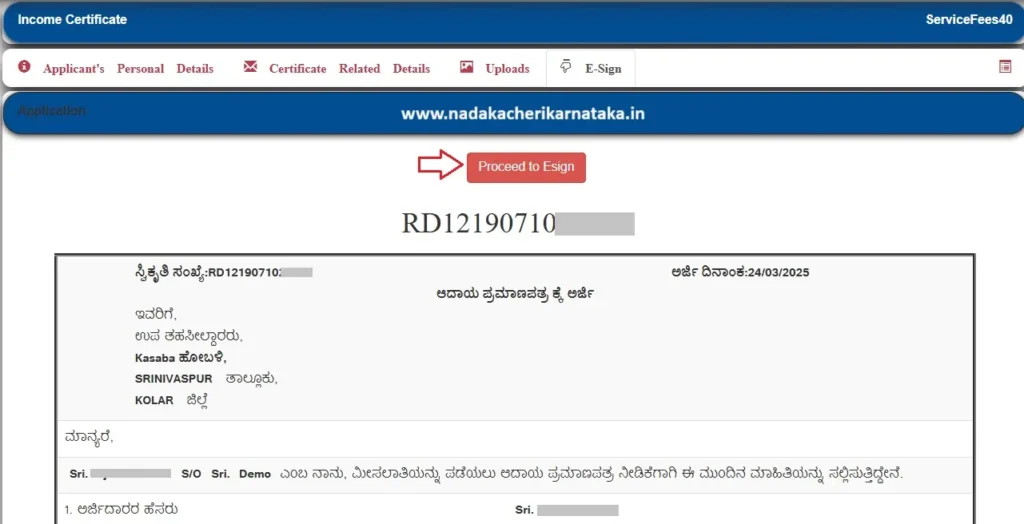
Step 12: After successful e-authentication, the payment option will be enabled.
Here, click PROCEED TO PAY, accept the payment terms and conditions, and pay the prescribed service fee using UPI, Card, or Net Banking.
Step 13: After the payment is successful, an acknowledgement copy will be generated. Download it and keep it for future reference.
Also Read:

Download Free Caste Certificate 2026

Nadakacheri Application Status

Print / Reprint Your Caste, Income, and Other Certificates Through Nadakacheri Portal
If you have any additional questions or face difficulties while applying for caste or income certificates in AJSK portal, feel free to comment below or contact the AJSK support team for assistance at helpdeskajsk@gmail.com.
FAQ’s
Can I edit my application after the RD number is generated?
No. Once the GSC/RD number is generated, the details entered in the previous stages cannot be edited. Therefore, check all the information carefully before submitting the application.
What should I do if I do not receive the OTP while applying?
Wait for a few minutes after requesting the OTP. If you still do not receive it, use the Resend OTP option and try again.
How can I get a caste or income certificate in English in Karnataka?
While applying through the Nadakacheri (AJSK) portal, select English as your preferred language from the top-right corner after logging in. Then the certificate will be generated in the language selected during the application process.
What should I do if my Aadhaar details are incorrect in the Nadakacheri application?
If your name, address, PIN code, or other details fetched from Aadhaar are incorrect and cannot be edited in the AJSK portal, you should first get the relevant details corrected in Aadhaar and then apply for the certificate again.
An RD Number has already been generated for my application; however, e-Sign and payment are still pending. I noticed that certain details entered in the application need to be corrected. At present, I am unable to find any option to edit or modify the application after generation of the RD Number.
Since the application has not yet been e-Signed and the payment has not been completed, kindly let me know how I can modify/correct the required entries. If editing is not possible at this stage, please advise whether the existing application can be cancelled/deleted so that I can submit a fresh application with the correct details.
Once the RD number is generated, you cannot edit the details.
Please try submitting a fresh application with the correct details. If the system does not accept the fresh application, try using a different mobile number once.
Trying to apply for a Family Tree Certificate in NK5 (Nadakacheri 5.0), but I am getting the error **“Cannot submit duplicate Request.”**
There is no way to retrieve the supposed existing application, and there is no option to cancel, reset, or start the application again. I am therefore completely locked out and unable to submit a fresh application.
Could Nadakacheri support please check the backend for any stuck/pending duplicate request and either provide the existing RD/application number or clear/reset it so that I can submit a fresh application?
Please advise the correct procedure to resolve this issue.
OTP is not getting immediately
Wait for sometime, you will get it..
I have submitted the application with incorrect details. Due to incorrect i don’t want to proceed esign.
So, now how can i correct my details before proceeding esign.
Try going back to previous step and correct details. If editing is not allowed, you can reapply with correct details.
Nadakacheri website itself not opening getting not found error
error message: “API is Off-line Please Contact the Admin”
It’s working now ..
I was applying for domicile certificate from nadakacheri portal. But they are rejected frist application and then I was again applied 2nd time with all required documents but they says documents not submit, I was submitted all documents in less than 300 kb .
arjidararu tanna kutumbada paditara chitti dakale odagisilla e arjiyannu tiraskarisalu koridde , Village Administrative Officer has given this feedback what should i do , i have applied for obc central.
Reapply by providing ration card details.
ನಾಡಕಚೇರಿ ವೆಬ್ಸೈಟ್ ನನ್ನ ಮೊಬೈಲಿನಲ್ಲಿ ಓಪನ್ ಆಗುತ್ತಿಲ್ಲ ದಯವಿಟ್ಟು ಸರಿಪಡಿಸಿಕೊಡಿ ಗೂಗಲ್ ನಲ್ಲೂ ಓಪನ್ ಮಾಡಿದರು ಓಪನ್ ಆಗುತ್ತಿಲ್ಲ
Caste