
The Government of Karnataka has made caste certificates available for download free of cost through the Nadakacheri (AJSK) portal.
The initiative comes amid the Election Commission of India’s Special Intensive Revision (SIR) of electoral rolls and the state’s verification drive for the Gruha Jyothi scheme. According to reports, citizens can download their caste certificates using their RD number, ration card number or Aadhaar number.
Earlier, citizens had to pay ₹40 to download a caste certificate. However, this service is now available completely free through the AJSK portal.
Below, you can find the complete process to search and download your caste certificate online in Karnataka for free in 2026.
How to Search and Download a Caste Certificate in Karnataka for Free?
Citizens can search and download their caste certificates using any of the following methods:
- RD Number (Certificate Number)
- Ration Card Number
- Aadhaar Number
Note: You can download your certificate using your Ration Card Number or Aadhaar Number only if they were linked while applying for the certificate. Otherwise, you must use the RD Number to access your certificate.
Using RD Number or Ration Card Number
Step 1: Visit the official Nadakacheri portal and open the AJSK Certificates page, or use the direct link provided below.
Step 2: Select Certificate Number if you have the RD Number, or choose Ration Card Number if you want to search using your ration card. Enter the required number, fill in the security code displayed on the screen, and click Search.
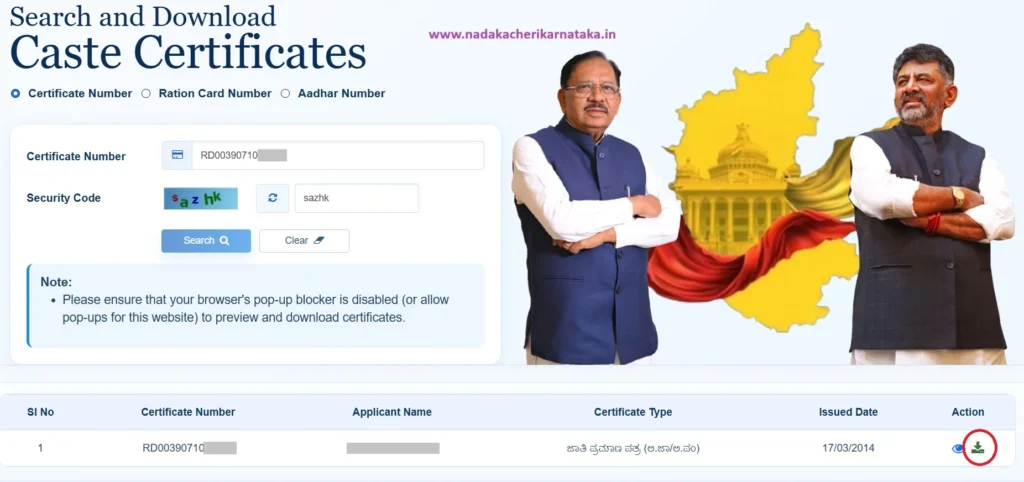
Step 3: The certificate details, including the Applicant Name, Certificate Type, and Issue Date, will be displayed. Verify that the information belongs to you, then click the Download icon to save the certificate as a PDF.
Using Aadhaar Number
Step 1: Visit the official Nadakacheri portal and open the AJSK Certificates page, or use the direct link provided below.
Step 2: Select the Aadhaar Number option and click Proceed.
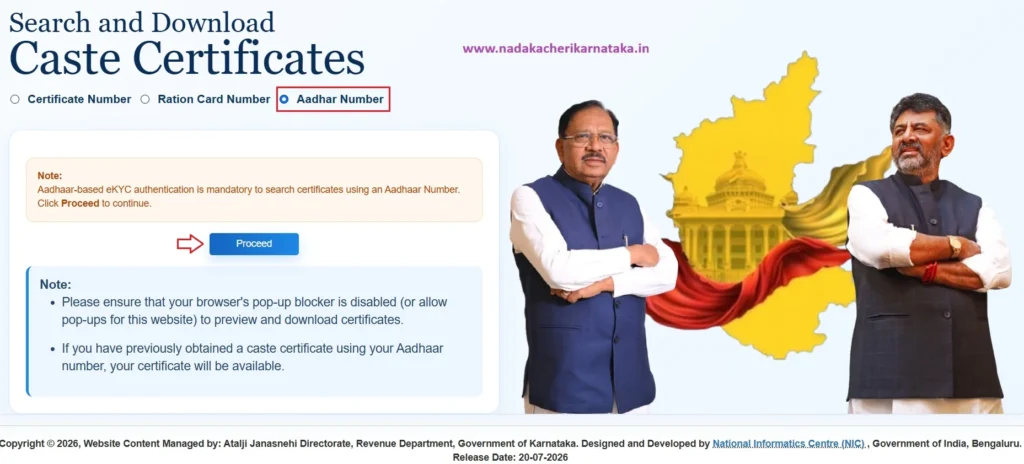
You will be redirected to the Aadhaar authentication page. Enter your Aadhaar number, choose OTP Authentication, and click Generate OTP.
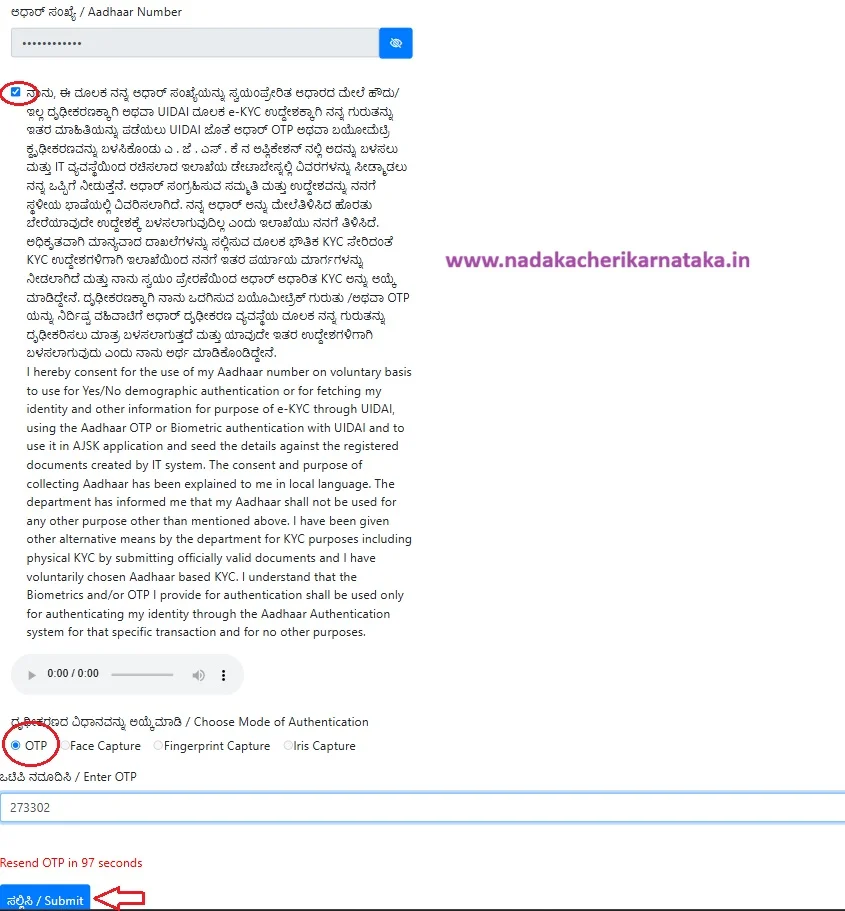
Step 3: Enter the OTP received on your Aadhaar-linked mobile number and click Submit.
Step 4: If your Aadhaar number is linked to your caste certificate, the certificate details will be displayed. Click the Download icon to save the certificate in PDF format.
If no certificate details are shown, it means your Aadhaar number is not linked to the certificate. In such cases, you must use the RD Number or Ration Card Number to download your certificate.
Using Mobile Number
Step 1: Go to the official Nadakacheri portal and open the AJSK Certificates page, or use the direct link provided below.
Step 2: Select the Mobile Number option and enter the 10-digit mobile number you used while submitting your caste certificate application. Then, click “Send OTP”, enter the OTP you received, and click “Verify”. If you enter the correct OTP, you will see a confirmation message saying “Mobile Verified”.
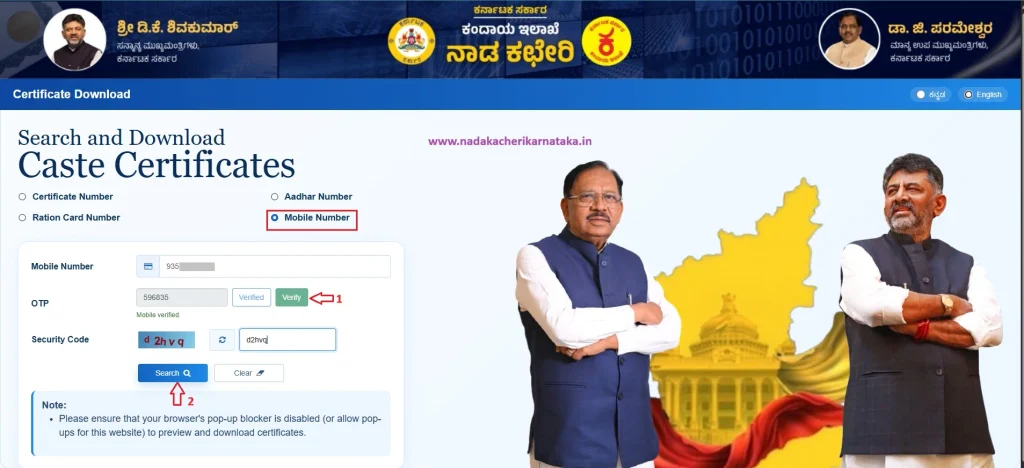
Step 3: Enter the security code exactly as displayed and click “Search”. The certificate details linked to your mobile number will be displayed. Check the details and use the Download option to save the certificate.
Note: If you see a “No records found” error after entering your mobile number, it means that your mobile number is not linked to your caste certificate. In such cases, you can still find and download your certificate using other available options, such as Aadhaar, Ration Card, or RD Number.
FAQ’s
Is it free to download a caste certificate from Nadakacheri in 2026?
Yes. The Government of Karnataka has made the caste certificate download service completely free. Citizens no longer need to pay the earlier fee of ₹40.
What details can I use to search for my caste certificate?
You can search using any one of the following:
1.RD Number (Certificate Number)
2.Ration Card Number
3.Aadhaar Number
4.Mobile NumberCan I download my caste certificate using my Aadhaar or Mobile number?
Yes, but only if your Aadhaar or Mobile number was linked to the certificate during the application process.
What should I do if my Aadhaar search does not show any certificate?
If no certificate is found, your Aadhaar is most likely not linked to the certificate. In that case, use your RD Number or Ration Card Number to search and download it.
Is the RD Number mandatory to download Caste Certificate?
The Certificate RD Number is mandatory only if your Aadhaar number or Ration Card Number is not linked to your certificate.
In which format is the caste certificate downloaded?
The certificate is downloaded as a PDF document, which you can save or print for future use.
Guru