
Ration Card e-KYC is the process of verifying the identity of every eligible family member listed on a ration card using Aadhaar-based authentication. It helps the government maintain accurate beneficiary records and ensure that ration benefits reach eligible citizens.
In recent years, the Government of Karnataka has made e-KYC verification mandatory for eligible ration card beneficiaries. Every family member listed on the ration card is required to complete the Aadhaar verification. Failure to complete e-KYC may affect access to ration benefits or lead to further action by the department.
Therefore, it is important to check the e-KYC status of all family members and complete the verification for anyone whose status is still pending.
Follow the step-by-step process below to check the latest e-KYC status of your ration card using Karnataka’s official AHARA portal.
How to Check Ration Card e-KYC Status in Karnataka?
Step 1: First, visit the official website of the Karnataka Food, Civil Supplies and Consumer Affairs Department, known as the AHARA portal:
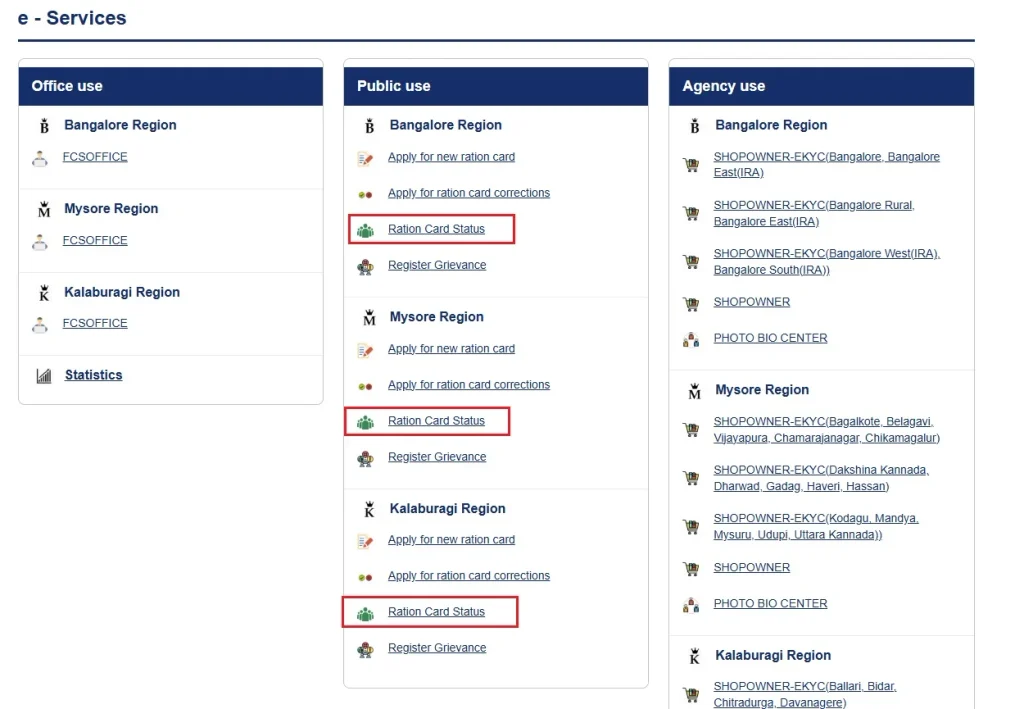
Step 2: On the homepage, scroll down to find the e-Services section. Under this section, locate the Public Use category.
Step 3: Under Public Use, you will find three regional sections: Bangalore Region, Mysore Region and Kalaburagi Region. Each region has separate e-Services links. Select the Ration Card Status option under your respective region.
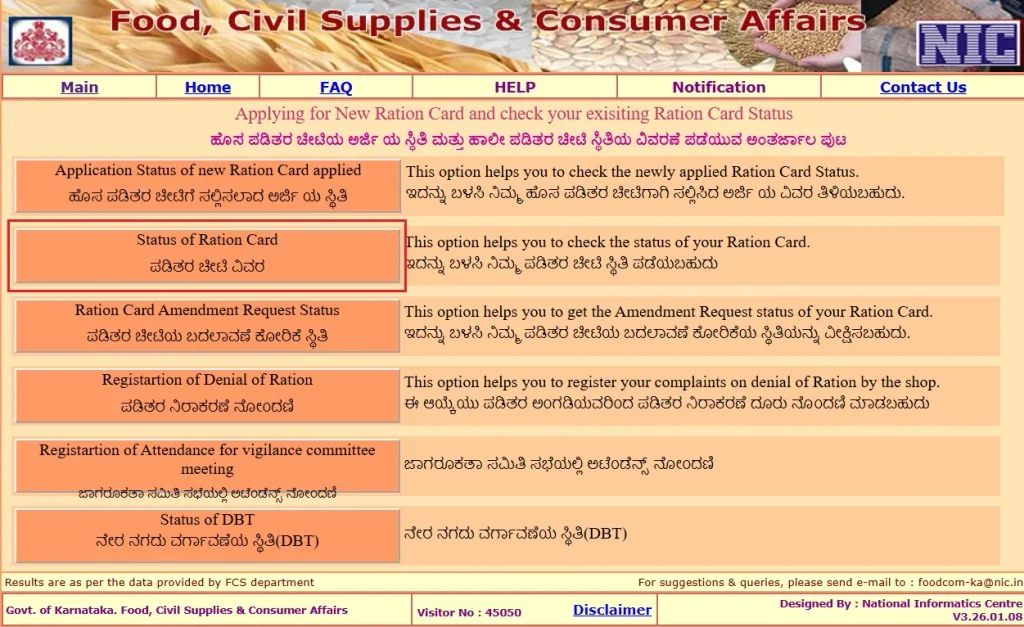
Step 4: A new Ration Card Status page will open. From the available options, select Status of Ration Card.
Step 5: Select the verification type as With OTP to view the detailed status of your ration card, including the names of family members and their corresponding e-KYC status.
If you select the Without OTP option, you may only be able to view limited information. Therefore, we recommend proceeding with the With OTP option to access the detailed information.
Step 6: Enter your ration card number and click Go. The names of the family members will appear in a drop-down list. Select the member whose mobile number is registered with Aadhaar for OTP verification, and click the Go button next to the drop-down list.
Step 7: Enter the displayed CAPTCHA code exactly as shown and click the Go button next to the CAPTCHA input field.
Step 8: Accept the terms and conditions displayed on the screen. Select OTP as the authentication type and click the Go button next to the OTP input section.
Step 9: Enter the OTP received on your registered mobile number and click Submit.
Step 10: Your ration card details will now be displayed. Find the Member Details section, where you can view the names of all family members and their corresponding e-KYC status. The status will be displayed as YES or NO.
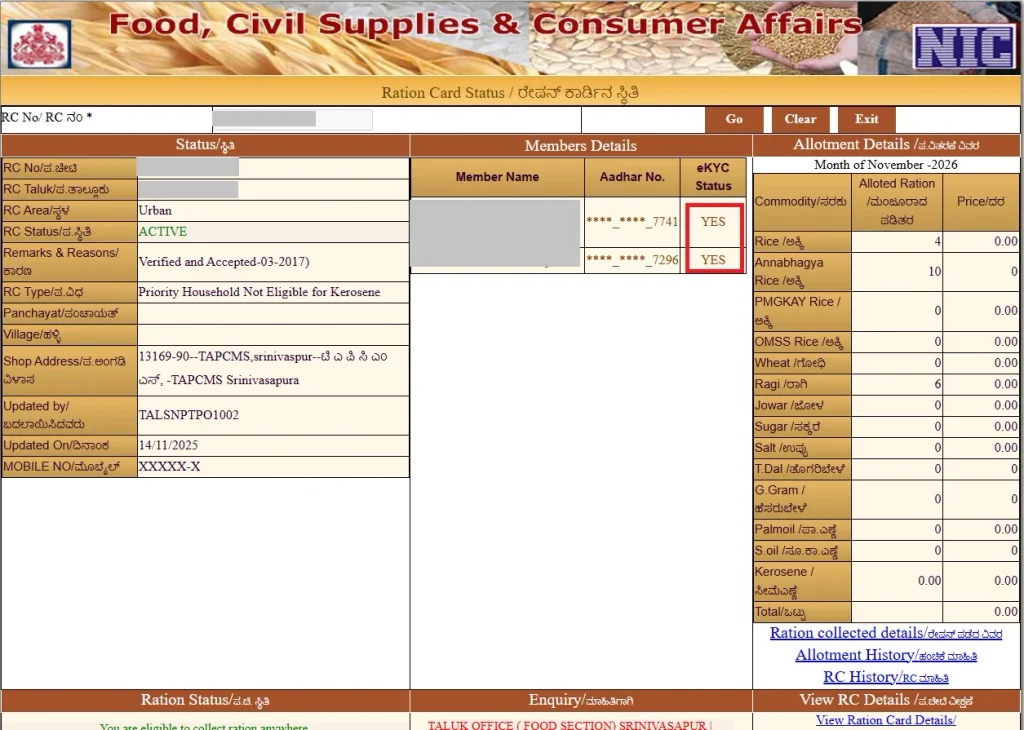
- YES: The member’s e-KYC verification has been completed.
- NO: The member’s e-KYC verification is still pending or has not been completed successfully.
What Happens If Your Ration Card e-KYC Is Pending?
If the e-KYC verification is pending for one or more family members, it may lead to the one or more following issues:
- The member whose e-KYC is pending may face difficulties accessing their entitled food grains. In certain cases, the department may initiate further verification or take action regarding the ration card.
- Benefits under government schemes such as Gruha Lakshmi, for which ration card details are used to establish eligibility, may be affected if the beneficiary’s eligibility or ration card status changes.
- The concerned family member may need to complete additional identity verification before their beneficiary details can be updated or verified in the department’s records.
- Pending e-KYC may cause delays or difficulties in accessing ration-related services until the required Aadhaar authentication is successfully completed.
Therefore, all ration card holders are advised to check the e-KYC status of every family member and complete any pending verification as soon as possible.
FAQ’s
Why does it show an invalid ration card number after entering my RC number?
If you see an Invalid RC Number or RC Number Not Found in Database error, first check whether you have entered the correct ration card number. Also, make sure you have selected the Ration Card Status link corresponding to your region.
What should I do if my e-KYC status shows as “NO”?
If the e-KYC status shows NO for one or more family members, visit your nearest Fair Price Shop (ration shop) and complete the Aadhaar-based e-KYC verification. Carry your ration card details and Aadhaar card. The verification can generally be completed through biometric authentication at the shop.