
If you have submitted an application for a fresh or renewed caste or income certificate in Karnataka, checking its status from time to time is very important to understand whether your application has been approved or rejected for any reason.
Usually, the Nadakacheri portal sends periodic updates to the mobile number provided during the application submission. However, if you are not receiving any updates or have applied using a different mobile number and no longer have access to it, you can still check your application status by following the process given below.
Details Required
Before checking the status of an application, make sure you have at least one of the following details:
- Acknowledgement Number (RD Number): You can find your RD number on the acknowledgement slip received after submitting your application.
- Mobile Number: The mobile number must be the same one you used while submitting the application.
Process to Check Caste / Income Certificate Application Status
Step 1: The first step is to visit the Nadakacheri or AJSK application tracking page at the following URL: https://ajsk.karnataka.gov.in/NK_Status.
Select your preferred language (English or Kannada) from the top-right corner.
Step 2: If you have your RD number, select the Acknowledgement No. option and enter the number starting with the prefix RD (Example: RD0039071020XXX). Then, enter the CAPTCHA code displayed on your screen and click CHECK STATUS.
If you want to check the status of another application, simply use the CLEAR option and then re-enter the RD number and CAPTCHA code to view the status of another application.
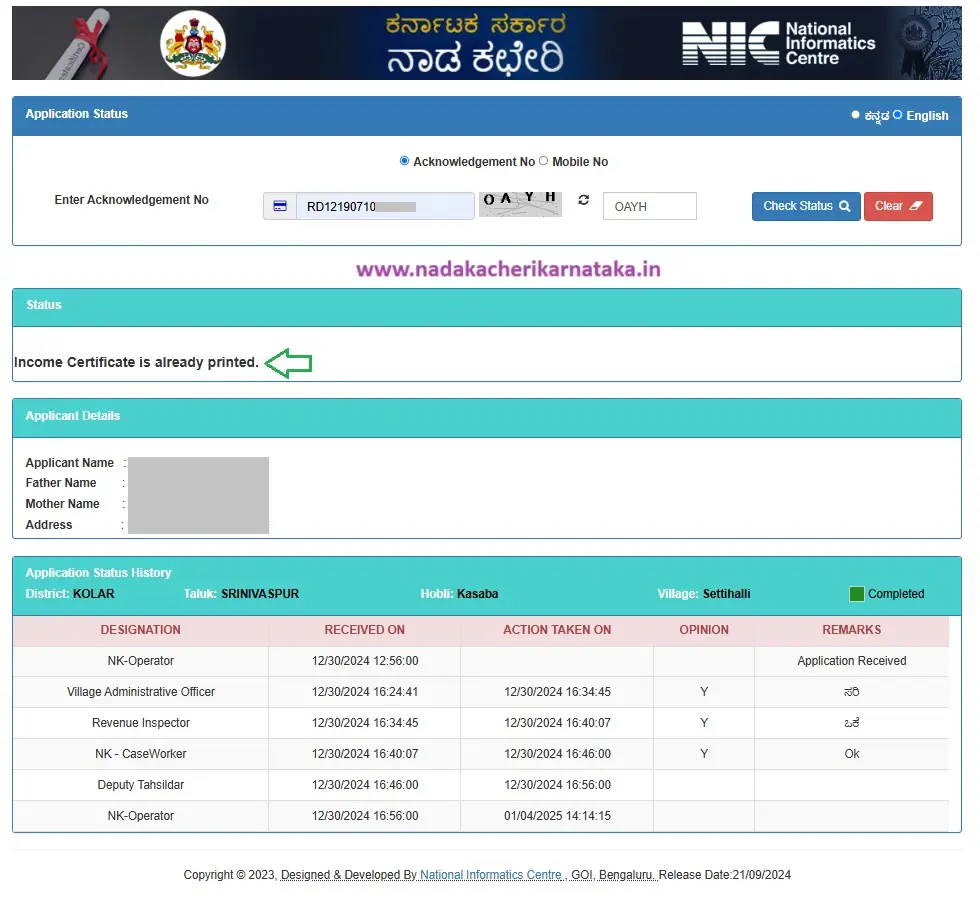
Step 3: If you do not have your Acknowledgement/RD number but still want to check your application status, select the Mobile No. option provided at the top.
Step 4: Now, enter your mobile number and click Send OTP. Once you receive the OTP, enter it and click Verify OTP.
If OTP verification fails due to an invalid or incorrect number, request another OTP using the Resend option.
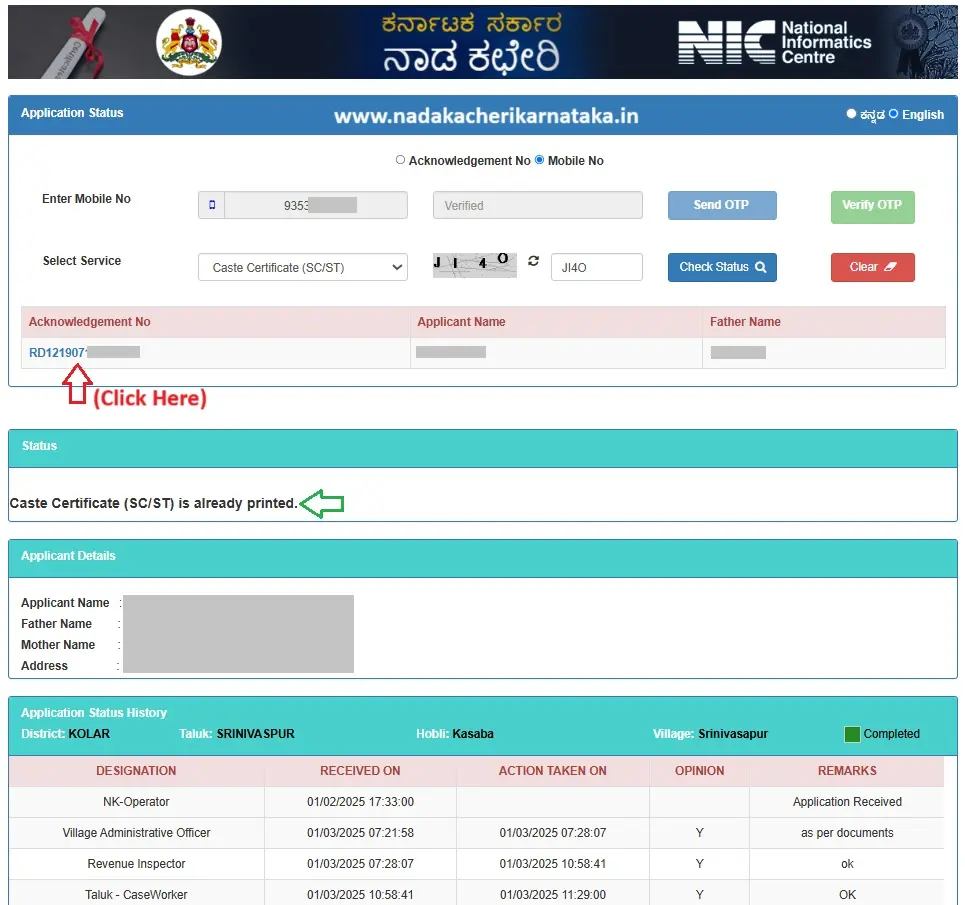
Step 5: Now, select the service you applied for from the available drop-down options.
For example, if you have submitted an application for a caste certificate, select the relevant service from the drop-down menu. If you have submitted an application for a caste certificate for SC/ST, it may be labelled as Caste Certificate (SC/ST).
Make sure to select the correct service name.
Step 6: After selecting the service name, enter the CAPTCHA code and click CHECK STATUS.
Step 7: Now, the acknowledgement number, applicant name, and father’s name associated with the submitted application and the mobile number you entered will be displayed.
Simply click on the acknowledgement number to view the detailed status of your application.
Also Read:

How To Download Free Caste Certificate 2026

How to Download Caste, Income, Domicile Certificates Using the Nadakacheri (AJSK) Portal
FAQ’s
I’m getting a “No Records Found” error while checking my application status. What should I do?
If the system displays a “No Records Found” message, either you have entered an incorrect RD number or the mobile number you entered does not match the number provided during the application submission.
Check the details you entered and try again.
My application status is showing as “Certificate Already Printed.” What does it mean?
It means that your application has been successfully approved and e-signed by the concerned Tahsildar, and your certificate has also been printed or downloaded already.
What should I do if my caste or income certificate application is rejected?
If your application status shows “Rejected,” check the application details or rejection remarks available on the Nadakacheri portal to understand the reason. Correct the issues mentioned, if applicable, and contact your concerned Nadakacheri centre or Tahsildar’s office for guidance on whether you need to submit a fresh application.
Family tree affidavit