
RTC stands for Record of Rights, Tenancy and Crops and is one of the most important land records for landowners in Karnataka. It contains essential information about a land, including the owner’s name, survey number, land extent, type of land, cultivation details, and other land-related information. It is commonly used to verify land ownership and obtain information about agricultural land.
In this article, we provide a step-by-step guide on how to download your RTC online using your land survey number through Bhoomi Online, the Karnataka Revenue Department’s official portal for accessing land records.
Process to Download RTC in Karnataka
Step 1: Visit the Karnataka Revenue Department’s official land records portal at the following URL: https://landrecords.karnataka.gov.in
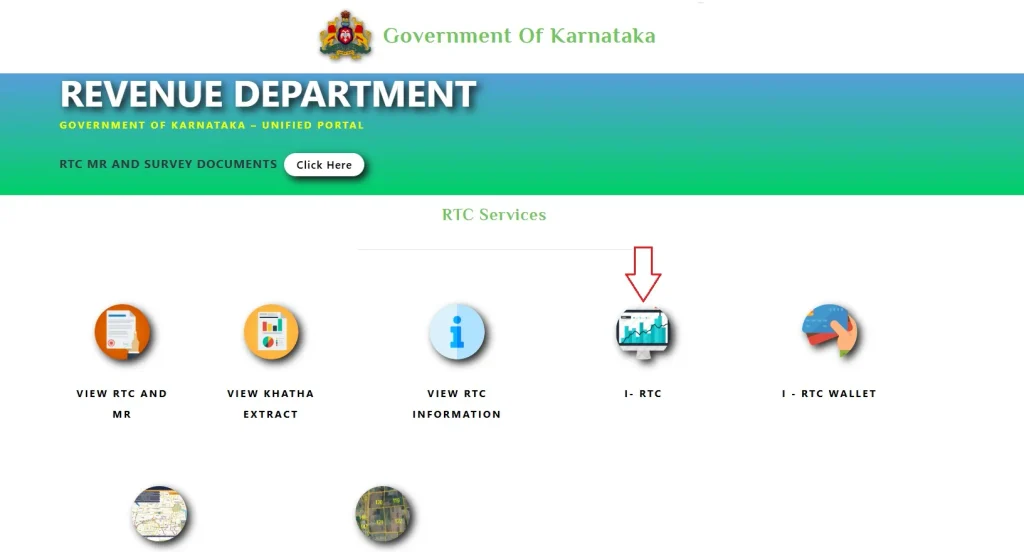
Step 2: On the homepage, look for the RTC Services section and click on the i-RTC option.
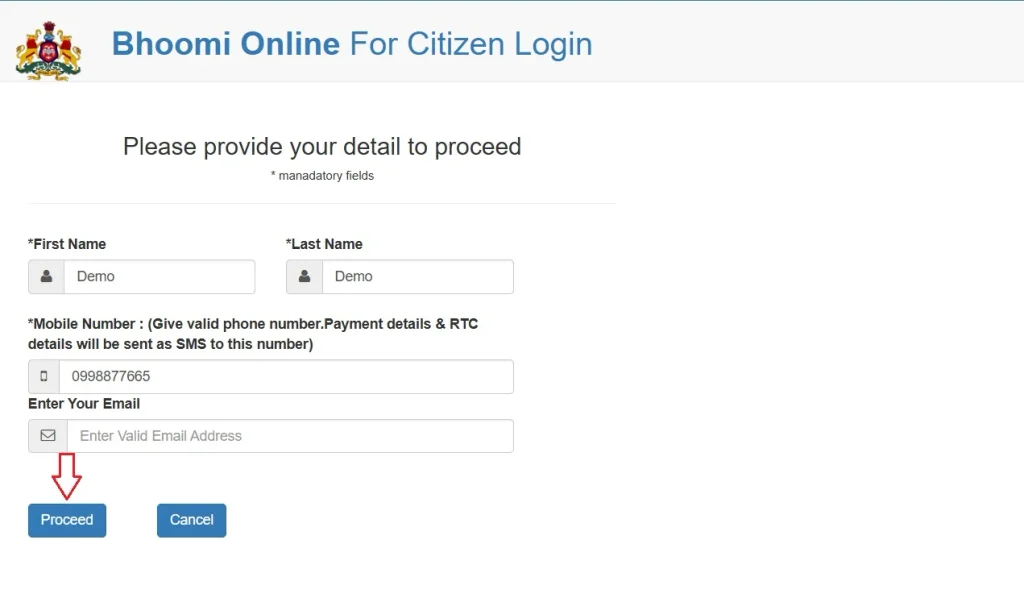
Step 3: Enter the required details, such as your first name, last name, and mobile number. Click Proceed to access the i-RTC service as a guest user.
Step 4: Select your district, taluk, hobli, and village name from the available dropdown lists. Then, enter your land survey number and click Go.
Step 5: The Surnoc and Hissa numbers associated with the survey number will be displayed. Carefully select the Surnoc and Hissa numbers applicable to your land, then click Fetch Details.
Step 6: The portal will display the available land details, including the owner’s name, land extent, and Khata number. Verify that the information matches your land records. If the details are correct, click View RTC to preview the document.
You will be able to view or download the preview copy, but it will contain a PREVIEW-ONLY watermark. To obtain the digitally signed copy, proceed to the payment step.
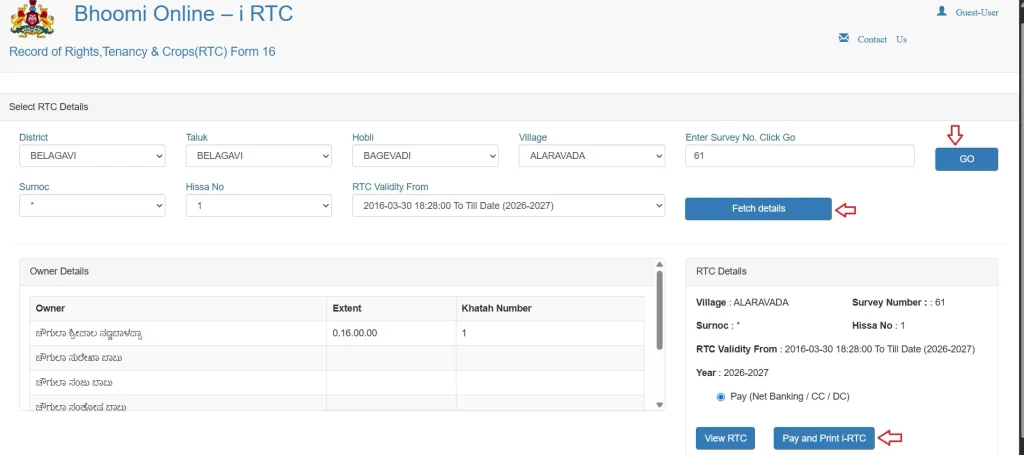
Step 7: After previewing the RTC, click the Pay and Print i-RTC button. Your name and mobile number entered during the guest-user process will be displayed. Review the payment terms and conditions, select the required checkbox, and click Pay Now.
Step 8: You will be redirected to the SBI e-Pay payment gateway. Select your preferred payment method from the available options, such as a debit card, credit card, net banking, or UPI, and pay the applicable fee.
Step 9: Once the payment is successful, an option to download your digitally signed i-RTC in PDF format will be enabled. Save the document for future reference.
FAQ’s
Is an i-RTC downloaded online valid for official purposes?
Yes, a digitally signed i-RTC issued through the official Karnataka land records portal is an authenticated land record and can be used for official purposes, subject to the requirements of the concerned institution or authority.
How much is the fee to download an i-RTC in Karnataka?
The current fee in 2026 to download an i-RTC in Karnataka is ₹25 per document. However, the fee may change from time to time as per the applicable government charges.
Why are my land details not showing after I enter the survey number?
If your land details do not appear or the displayed information is incorrect, verify that you have selected the correct district, taluk, hobli, village, survey number, Surnoc, and Hissa number.
If the issue persists, contact your taluk office’s (Bhoomi cell).