
The citizens of Karnataka can apply for various services offered by the Revenue Department through the Nadakacheri (AJSK) portal. These include services like caste, income, domicile, residence certificates, pension and other schemes, all accessible via the public login page. Below is the complete process to avail of these services on the portal.
Step-by-Step Process to Apply for Nadakacheri Services or Certificates
Step 1: Visit the Nadakacheri 5.0 Public Login Page using the link provided and log in using your mobile number and OTP.
(Note: There is no need to create an account. Citizens can directly log in using their mobile number.)
Step 2: After logging in, you will see the Citizen Dashboard. Under the New Request menu, select the service or certificate you wish to apply for.
(Note: You can view the list of all services offered through the AJSK portal, along with the required documents and service fee details, on our Nadakacheri Services page.)
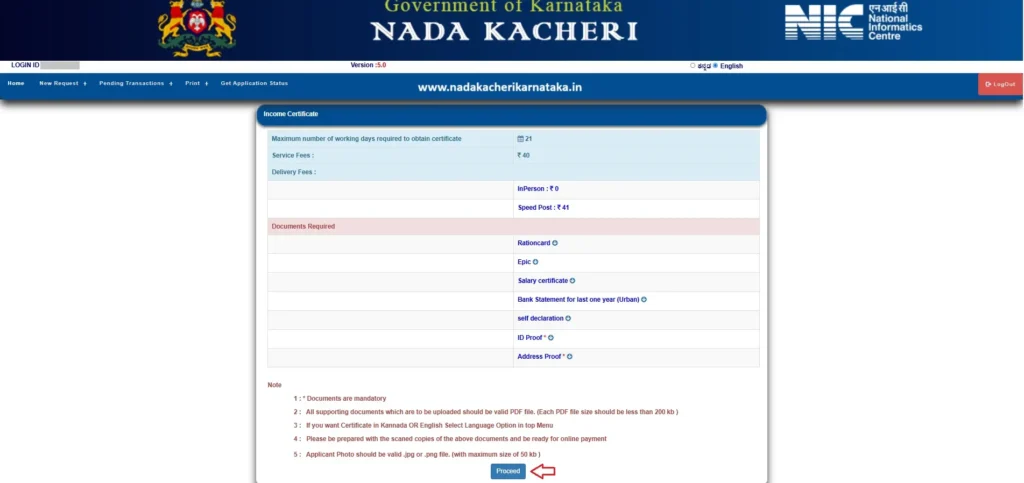
Step 3: An online application form for the selected service or certificate will appear. For demonstration purposes, we have selected the Income Certificate. As a result, the Income Certificate application form is displayed on the screen. Click the Proceed button to begin filling out the form.
Step 4: The system will now ask, Do You Have a Ration Card?
- If yes, select Yes, enter your ration card number, and click Proceed. A list of family members listed in the ration card will appear. Select the applicant’s name from the list.
- If no, select No and click Proceed. You will be prompted to complete Aadhaar Authentication. Enter your Aadhaar number and verify it using the OTP sent to your registered mobile number.
Step 5: Fill in the Applicant’s Personal Details such as:
- Father’s/Husband’s Name
- Address (as per Aadhaar) with Pincode
- Email ID and Mobile Number

Complete the mobile and email authentication by clicking Send OTP next to the respective fields. Once verified, click Next. (Note: Additional details may be required depending on the selected service or certificate.)
Step 6: Upload the required documents in PDF format (each file size must be less than 200 KB) using the Upload Document button. Once all documents are uploaded, click Submit.

Step 7: A preview of your application will be displayed. Review all the details carefully and click Proceed to E-Sign. Use your Aadhaar details to e-sign the application:
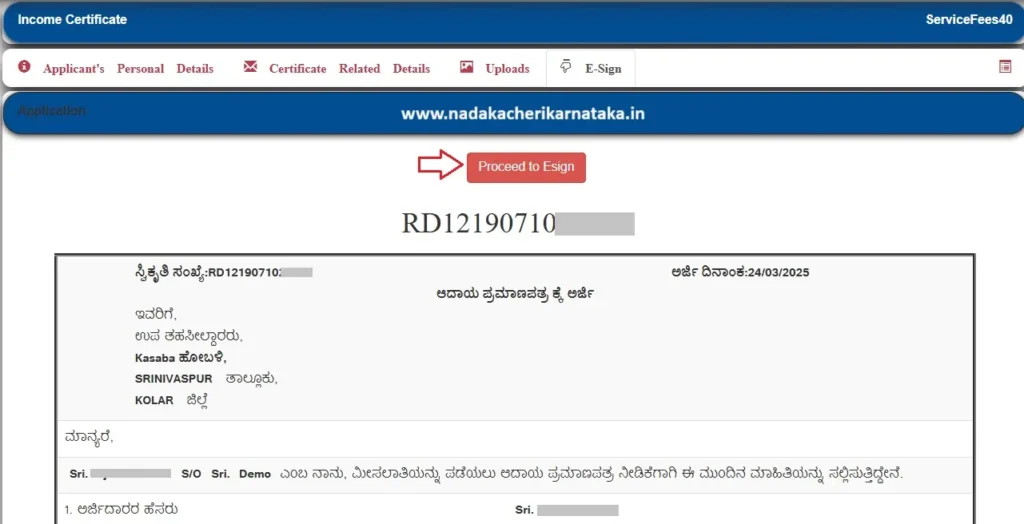
- Enter your Aadhaar number and click Get OTP.
- Enter the OTP received on your registered mobile number to complete the e-sign process.

Step 8: Pay the service fee (if applicable) using any UPI app and submit your application. An acknowledgement will be generated with a unique RD number. Print it and keep it for future reference.
By following these steps, your application for the desired service or certificate will be successfully submitted through the Nadakacheri’s AJSK portal.
Also Read:

Download Free Caste Certificate 2026

Nadakacheri Application Status

Print / Reprint Your Caste, Income, and Other Certificates Through Nadakacheri Portal
Points to Remember
- All supporting documents that need to be uploaded on the portal must be valid PDF files (each file size should be less than 200 KB).
- The application will be forwarded to the selected Hobli Revenue Department officials for the approval process.
- An application is considered valid and processed only after successful eSign and payment.
- The status of your application can be viewed at any time by using the Get Application Status option in the Citizen Dashboard.
- If payment or eSign fails or remains incomplete during the application process, both can be retried using the Pending Transactions option in the Citizen Dashboard.
If you have any additional questions or face difficulties while applying for services on the Nadakacheri’s AJSK portal, feel free to comment below or contact the AJSK support team for assistance at helpdeskajsk@gmail.com.
An RD Number has already been generated for my application; however, e-Sign and payment are still pending. I noticed that certain details entered in the application need to be corrected. At present, I am unable to find any option to edit or modify the application after generation of the RD Number.
Since the application has not yet been e-Signed and the payment has not been completed, kindly let me know how I can modify/correct the required entries. If editing is not possible at this stage, please advise whether the existing application can be cancelled/deleted so that I can submit a fresh application with the correct details.
Once the RD number is generated, you cannot edit the details.
Please try submitting a fresh application with the correct details. If the system does not accept the fresh application, try using a different mobile number once.
Trying to apply for a Family Tree Certificate in NK5 (Nadakacheri 5.0), but I am getting the error **“Cannot submit duplicate Request.”**
There is no way to retrieve the supposed existing application, and there is no option to cancel, reset, or start the application again. I am therefore completely locked out and unable to submit a fresh application.
Could Nadakacheri support please check the backend for any stuck/pending duplicate request and either provide the existing RD/application number or clear/reset it so that I can submit a fresh application?
Please advise the correct procedure to resolve this issue.
OTP is not getting immediately
Wait for sometime, you will get it..
I have submitted the application with incorrect details. Due to incorrect i don’t want to proceed esign.
So, now how can i correct my details before proceeding esign.
Try going back to previous step and correct details. If editing is not allowed, you can reapply with correct details.
Nadakacheri website itself not opening getting not found error
error message: “API is Off-line Please Contact the Admin”
It’s working now ..
I was applying for domicile certificate from nadakacheri portal. But they are rejected frist application and then I was again applied 2nd time with all required documents but they says documents not submit, I was submitted all documents in less than 300 kb .
arjidararu tanna kutumbada paditara chitti dakale odagisilla e arjiyannu tiraskarisalu koridde , Village Administrative Officer has given this feedback what should i do , i have applied for obc central.
Reapply by providing ration card details.
ನಾಡಕಚೇರಿ ವೆಬ್ಸೈಟ್ ನನ್ನ ಮೊಬೈಲಿನಲ್ಲಿ ಓಪನ್ ಆಗುತ್ತಿಲ್ಲ ದಯವಿಟ್ಟು ಸರಿಪಡಿಸಿಕೊಡಿ ಗೂಗಲ್ ನಲ್ಲೂ ಓಪನ್ ಮಾಡಿದರು ಓಪನ್ ಆಗುತ್ತಿಲ್ಲ
Caste