
In this article, we will show you how to download your caste, income, domicile, or any other certificate issued by the Revenue Department of Karnataka through the Nadakacheri (AJSK) portal.
New Update: You can now download eligible caste certificates free of cost through the Nadakacheri portal. For more details, click here. For all other certificates, follow the process explained below.
Process to Download Nadakacheri Certificates
Step 1: Log in to the Official AJSK Portal
First, visit the official AJSK portal at https://ajsk.karnataka.gov.in/NK5_Online/Login/Login_Public and log in using your mobile number and OTP.
Step 2: Select Print Certificate
After logging in, you will see a menu called Print, which contains two options: Print Certificate and Reprint.
If you have submitted a new application and are downloading your certificate for the first time, select Print Certificate. Your certificate details should appear if the certificate is approved and eligible for first-time printing. Click the download icon to save your certificate.
Please remember to use the same mobile number linked to your application. Otherwise, you may not find your certificate under the Print Certificate option.
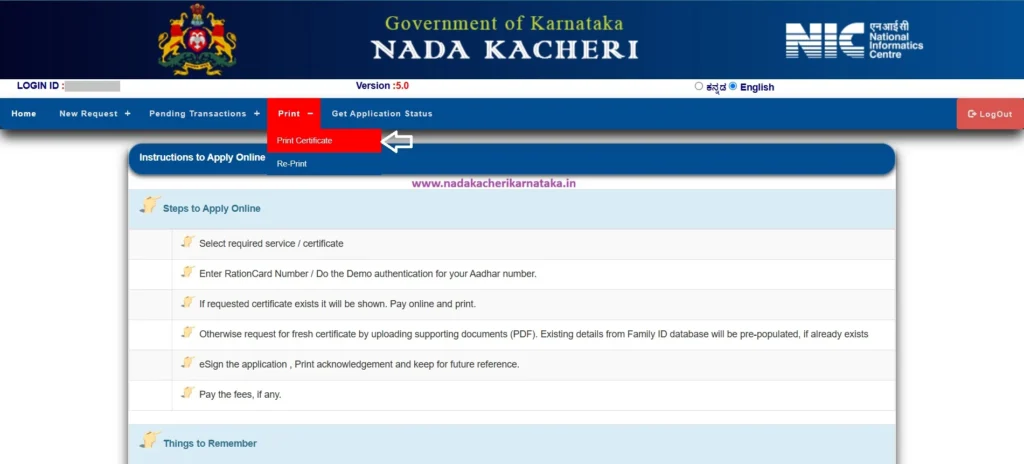
Step 3: Select Reprint for Subsequent Downloads
If you have already printed your certificate once and need another copy, you must use the Reprint option. Select this option and follow the steps below.
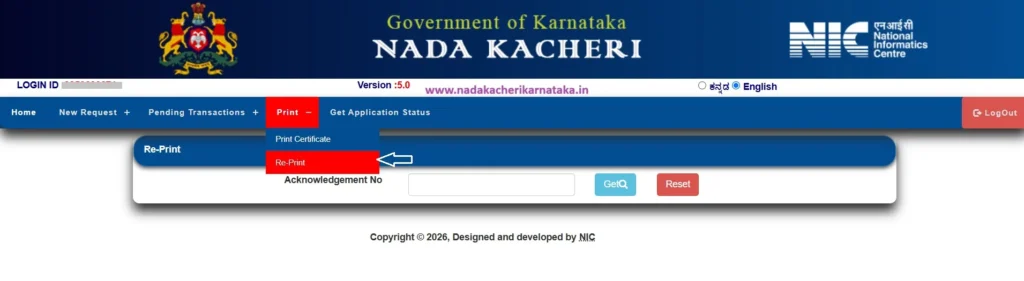
Step 4: Enter Your RD Number
After selecting the Reprint option, enter your certificate’s RD number and click the GET button.
Step 5: Verify Your Certificate Details
The certificate details, such as the applicant’s name, father’s or husband’s name, application date, and certificate type, will be displayed.
Check all the details carefully. Then, tick the checkbox under the table heading Select to confirm that the details are correct.
Step 6: Preview Your Certificate
Click the Preview button to view your certificate before proceeding with the payment.
Review the certificate details carefully before continuing.
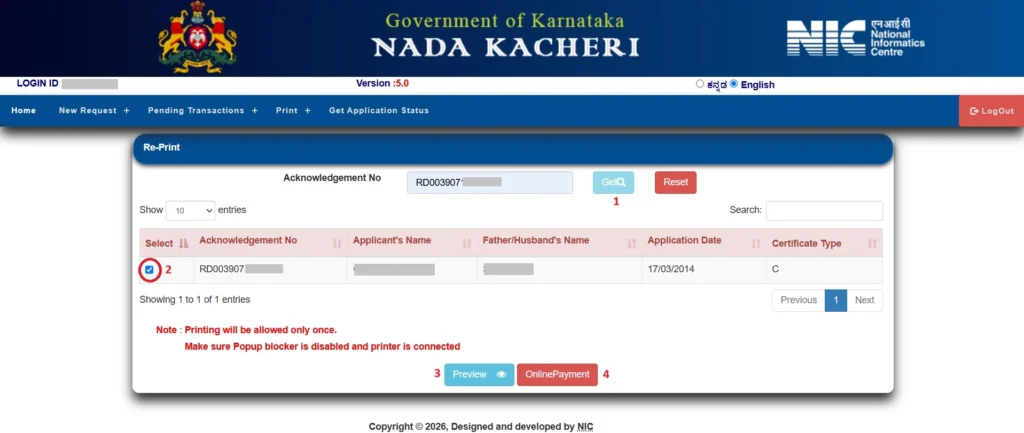
Step 7: Proceed to Online Payment
After previewing the certificate, click the ONLINE PAYMENT button. Accept the payment terms and conditions displayed by the Nadakacheri (AJSK) portal and click the PhonePe button provided below.

Step 8: Complete the Payment
A QR code will be displayed on the screen. Scan it using the PhonePe application and complete the transaction.

Step 9: Download or Print Your Certificate
Once the payment is successful, the download or print option will be enabled.
Make sure that pop-ups are allowed for the Nadakacheri website so that the certificate can open correctly. Follow the instructions displayed on the portal to download or print your certificate.
FAQ’s
How much is the fee to download caste and income certificates in Karnataka?
The reprint fee is ₹40 per certificate when downloaded through the Nadakacheri (AJSK) portal. Eligible caste certificates may be available for free through the separate download facility mentioned above. Check the current fee displayed on the official portal before making a payment.
Why did my certificate download fail after payment?
If your certificate download fails after payment, check whether pop-ups are enabled for the Nadakacheri website. Also, avoid clicking the browser’s Back button or refreshing the page while the transaction or certificate-generation process is in progress.
If the problem continues, check the payment status and follow the instructions provided by the portal before attempting another payment.Why are my certificate details not showing after I enter the RD number?
If your certificate details do not appear after entering the RD number, you may have entered an incorrect number, or your application may not yet have been approved.
Recheck the RD number and check your application status to confirm whether the certificate has been approved. If the certificate is approved but the details still do not appear, contact the concerned Nadakacheri/AJSK office for assistance.